 DeltaExecutorApp
Anti-Error • Beast ESP • Teleports • Rescue Player • NoClip • Speed • No Key • 📱 Mobile • 💻 PC
You start hacking a computer, miss one skill check, and the computer beeps loud. Now the Beast knows where you are. One hammer hit later, you are tied up and stuck in a freeze pod. With The Hollow event live, you also need to fill your candy bucket and escape to get the free Beasthammer UGC.
A Flee the Facility Script makes this much easier. Anti-Error skips the skill checks, ESP shows the Beast through walls, and Teleports take you to computers and freeze pods in one tap. Below, you will find the latest working Flee the Facility scripts, what each feature does, and how to run them with Delta Executor.
[🎃EVENT] Flee the Facility – The Hollow Script, Easy Candy (UGC ITEMS)
This script has five tabs: Account Info, Survivor Mode, Beast Mode, Teleports and Local Player. It works on mobile and PC and runs smoothly in Delta Executor.
How to Run Flee the Facility Script in Delta Executor (Android & iOS)
Running this script is easy. Just follow these steps one by one.
- Step 1: Install Delta Executor on Android mobile. If you are on an iOS device, make sure to learn how to install Delta iOS on your device first because it takes a little more time and effort to install Delta on iOS mobile. You can’t simply download Delta by clicking Download button, you must go through the Sideloadly process.
- Step 2: Get Your Delta Key: Open Delta and tap Receive Key. Finish the short tasks, tap Unlock Content, then tap Continue. Copy your key, paste it into Delta, and tap Continue. The key lasts for 24 hours.
- If you get stuck, read our Delta Key guide. In this guide, I have explained how to get the Delta key step by step with images. You can also refer to Steal an Egg Script where I have showed you how to get the Delta key in the most simple and easy way.
- Step 3: Open Flee the Facility: Join a Flee the Facility server in Roblox and wait for the game to load.
- Step 4: Open the Delta Menu: Tap the Delta icon on your screen. Then tap the Home icon to open your script list.
- Step 5: Upload the Script: Tap the blue Upload button. A small window will open. In the Title box, type a name like “flee the facility”. In the Script box, paste the script you copied from this page.
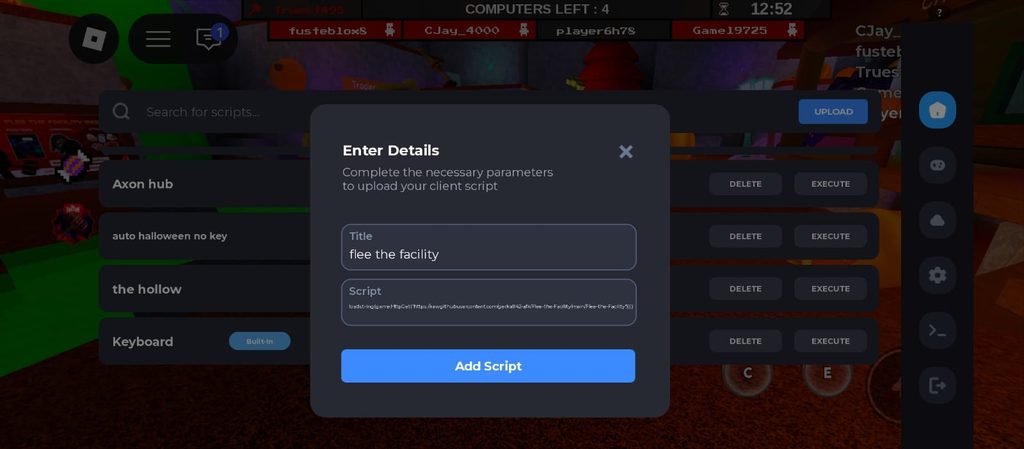
- Step 6: Add the Script: Tap Add Script. Your script will now show up in the list.
- Step 7: Execute: Tap Execute next to your script. The script menu will open inside the game. Now you can turn on Anti-Error, ESP, Teleports and other features.
- Tip: You only need to add the script once. Next time, just open Delta Roblox Executor, find the script in your list and tap Execute.
- For more help, read our full guide on how to use Delta Executor.
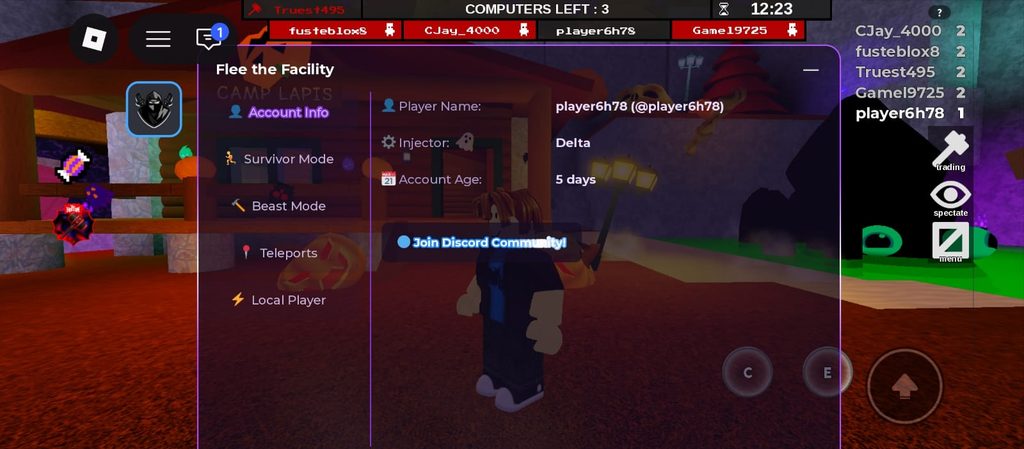
When you run the script, the first tab that opens is Account Info. It shows your Roblox player name, the executor you are using, and how old your account is.
In this screenshot, the injector says Delta, which shows the script is running with Delta Executor.
At the bottom, there is a Join Discord Community button to join the script’s Discord server.
On the left side, you can see the other tabs: Survivor Mode, Beast Mode, Teleports and Local Player.
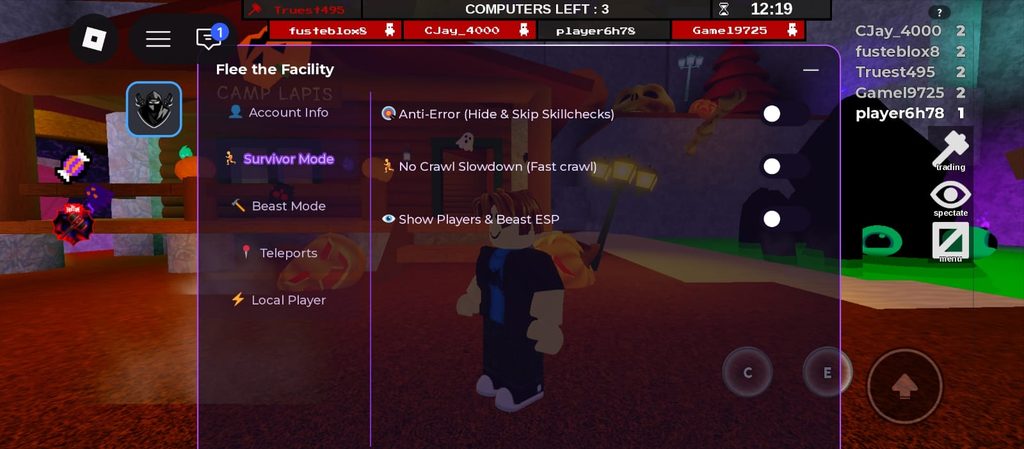
The Survivor Mode tab is for when you are running from the Beast, and it has three toggles. Anti-Error (Hide & Skip Skillchecks) skips the skill checks while you hack a computer, so you don’t hit an error.
No Crawl Slowdown (Fast crawl) lets you crawl without slowing down. Show Players & Beast ESP shows the Beast and other players through walls, so you always know where they are.
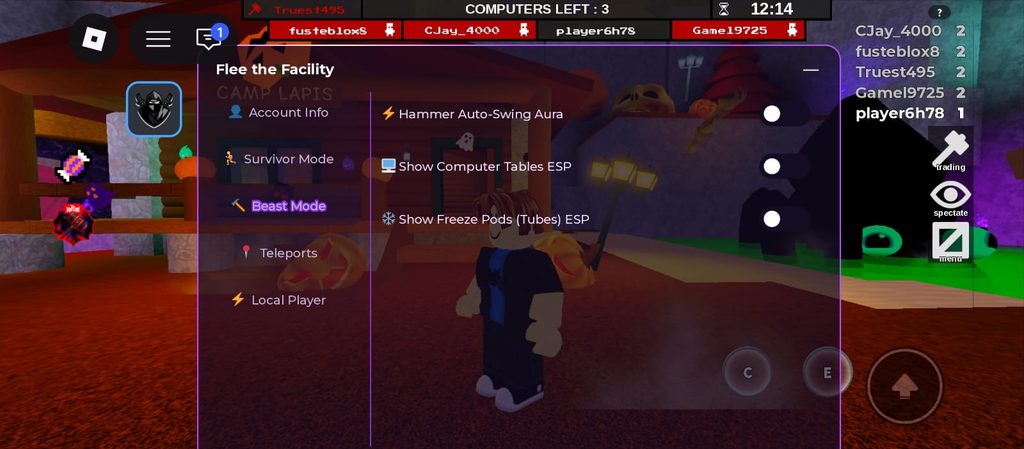
The Beast Mode tab is for when you play as the Beast, and it has three toggles. Hammer Auto-Swing Aura makes your hammer swing on its own.
Show Computer Tables ESP shows every computer on the map through walls. Show Freeze Pods (Tubes) ESP shows every freeze pod on the map, so you can find them fast.
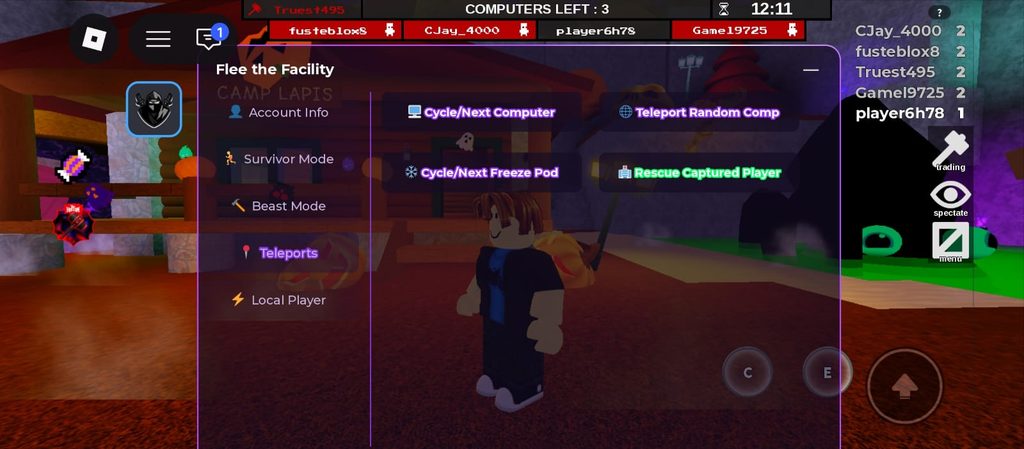
The Teleports tab has four buttons that move you around the map in one tap. Cycle/Next Computer takes you to the next computer, and Teleport Random Comp takes you to a random one.
Cycle/Next Freeze Pod takes you from one freeze pod to the next. Rescue Captured Player helps you save a player who has been captured.
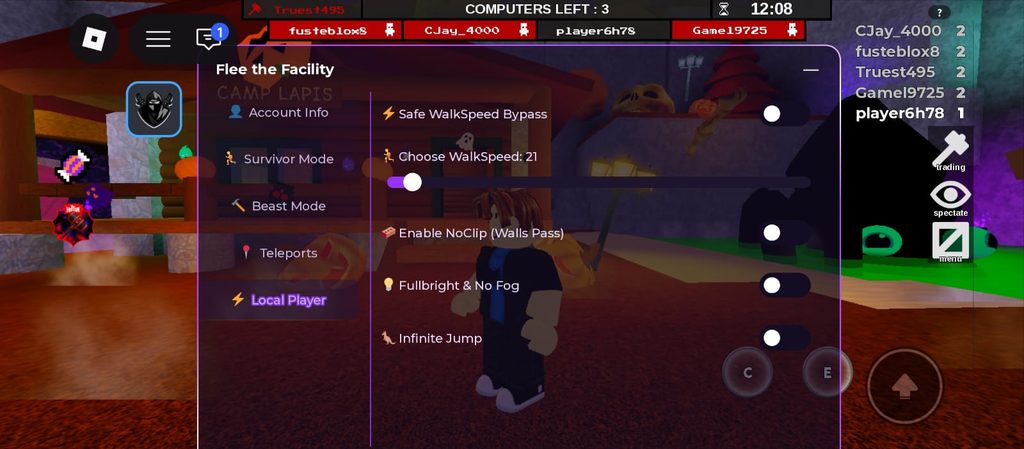
The Local Player tab controls how your character moves, and it has five options. Safe WalkSpeed Bypass turns on the speed change.
Choose WalkSpeed is a slider that sets how fast you run, and here it is set to 21. Enable NoClip (Walls Pass) lets you walk through walls.
Fullbright & No Fog makes the map bright and removes the fog. Infinite Jump lets you keep jumping in the air.
Flee the Facility Script | Auto Farm Beast | Auto Computer and more!
Key RequiredParagon is a Flee the Facility script made by Dev Paragon. It has seven tabs: Home, Survivor, Beast, Visuals, Player, Webhooks and Settings.
It shows full round info and can do computers for you, help you escape and rescue friends, and farm Beast wins.
Note: At the time of writing, Paragon is free to use, but it needs a key. You get a free key from the Paragon Discord by finishing a short ad process.
This key works for 6 hours only, so after 6 hours you have to go through the ads again to get a new one.
If you don’t want to do this every time, Paragon also sells keys through a ticket on their Discord: $8 for a monthly key or $15 for a lifetime key. I used the free 6-hour key to test the script and show you how it works.
To run the script follow the steps above as we did for the first script. You have to upload the script and enter its title and then tap Execute.
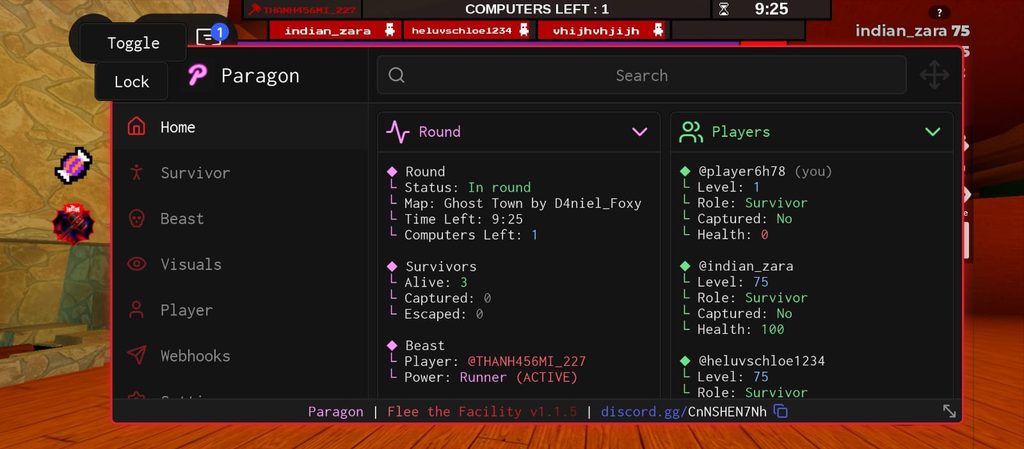
The Home tab shows everything about the current round. Under Round, you can see the status, the map name, the time left and how many computers are left.
It also shows how many survivors are alive, captured or escaped. Under Beast, it shows who the Beast is and which power the Beast has.
On the right, the Players list shows every player’s level, role, whether they are captured, and their health.
Lower in the Home tab, there is a Teleport section. You pick a player from the list and tap Teleport to Player to go to them.
You can also tap Teleport to Lobby, Trading Post, VC Server or Pro Server. The players list on the right also shows the Beast’s power and how much it is charged.
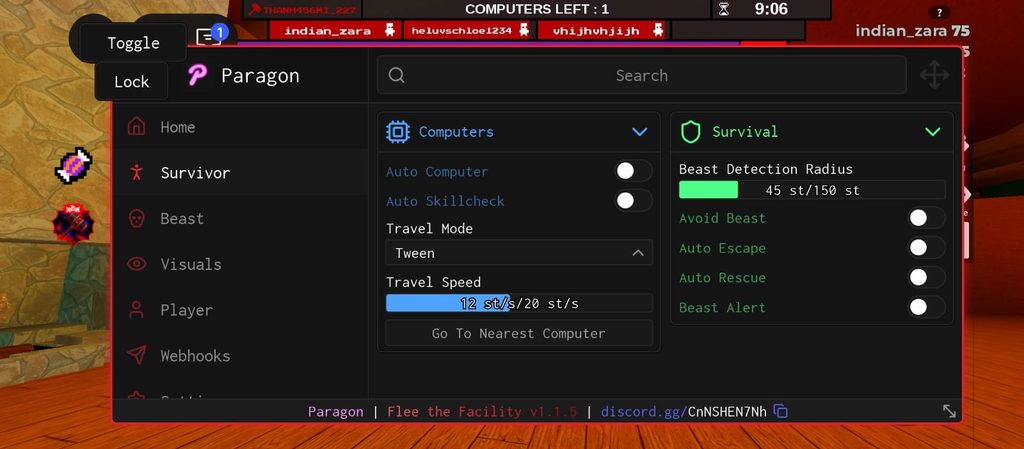
The Survivor tab has two sections. In Computers, Auto Computer hacks computers for you, and Auto Skillcheck does the skill checks for you.
Travel Mode (set to Tween here) and Travel Speed control how you move to each computer, and Go To Nearest Computer takes you to the closest one.
In Survival, Beast Detection Radius sets how close the Beast can get before the script reacts.
Avoid Beast keeps you away from him, Auto Escape helps you get out when the exits open, Auto Rescue saves captured friends, and Beast Alert warns you when the Beast is near.
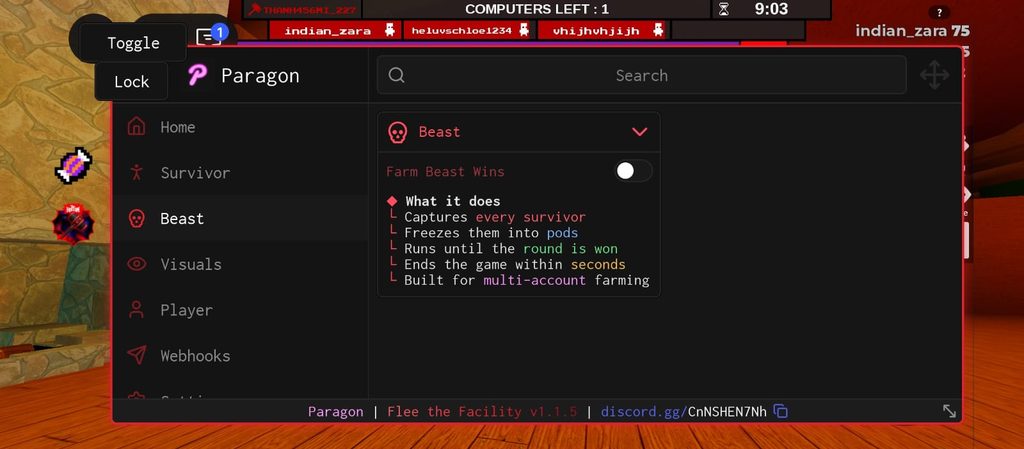
The Beast tab has one toggle, Farm Beast Wins. The script explains what it does: it captures every survivor, freezes them into pods, and keeps going until the round is won. It ends the game within seconds and is built for multi-account farming.
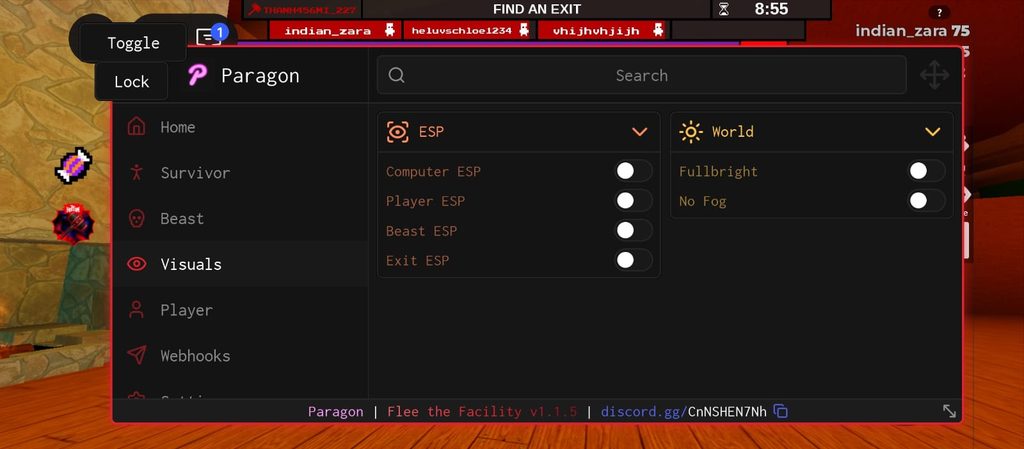
The Visuals tab has two sections. Under ESP, you can turn on Computer ESP, Player ESP, Beast ESP and Exit ESP to see them through walls. Under World, Fullbright makes the map bright, and No Fog removes the fog.
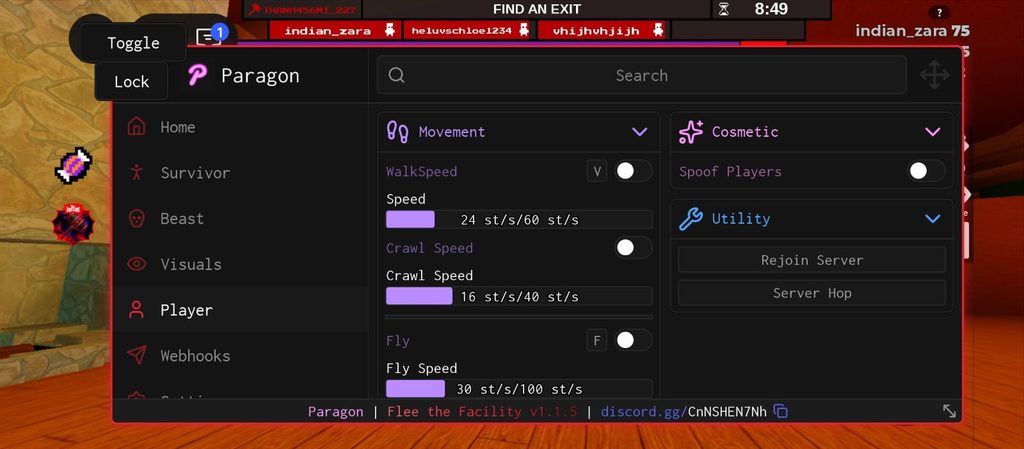
The Movement section changes how your character moves. WalkSpeed has a speed slider (24 here, up to 60). Crawl Speed has its own slider (16 here, up to 40).
Fly has a Fly Speed slider (30 here, up to 100). Noclip lets you walk through walls, and Infinite Jump lets you keep jumping in the air.
Some options also show a key you can press, like V for WalkSpeed, F for Fly and N for Noclip.
On the right side of the Player tab, the Cosmetic section has Spoof Players, which changes how players look only on your own screen.
The Utility section has Rejoin Server to join the same server again and Server Hop to move to a new server.
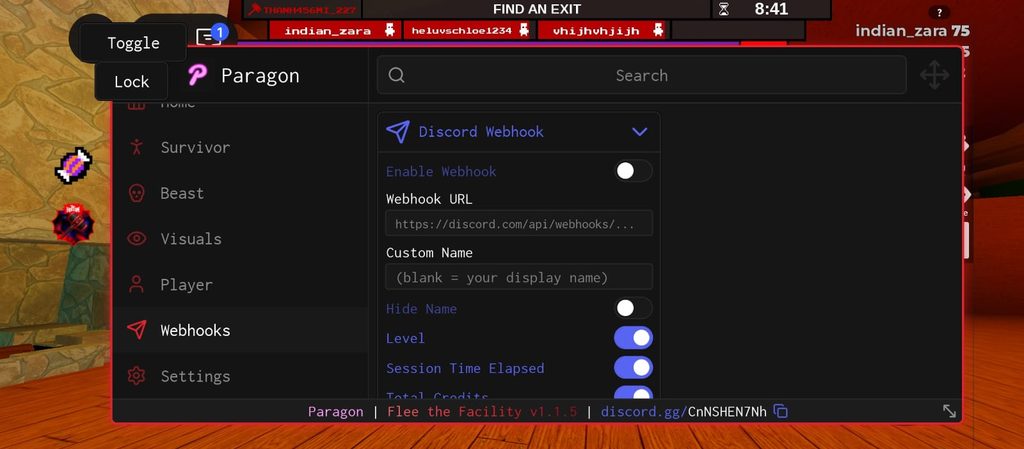
The Webhooks tab sends your game stats to your Discord. You turn on Enable Webhook, paste your Webhook URL, and add a Custom Name (leave it blank to use your display name).
Hide Name hides your name. You can choose to send your Level, Session Time Elapsed, Total Credits and Session Credits Earned, and Send Test sends a test message.
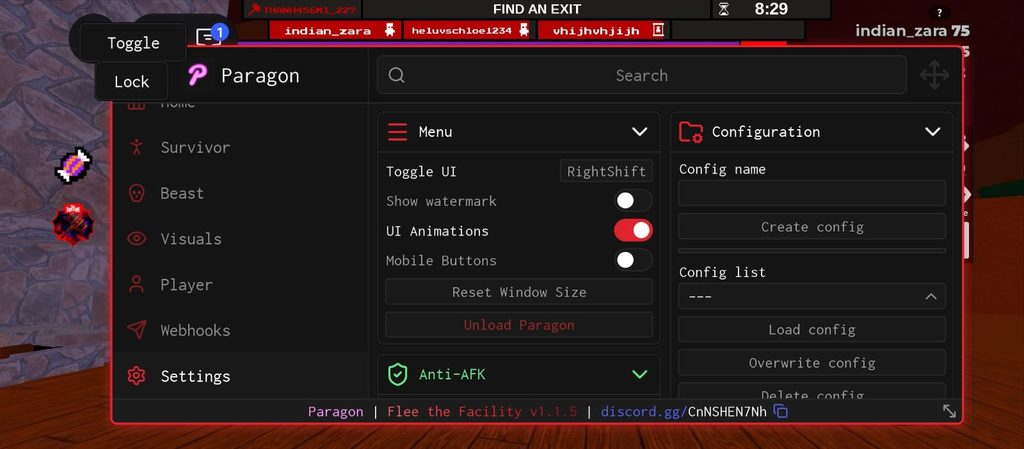
The Menu section changes the script window. Toggle UI sets the key that shows or hides the menu (RightShift).
Show Watermark, UI Animations and Mobile Buttons turn those parts of the menu on or off.
Reset Window Size puts the menu back to its normal size, and Unload Paragon closes the script.
The Anti-AFK section shows that it is always on and the idle kick is blocked, so you don’t get kicked for standing still. On mobile, Toggle and Lock buttons also show at the top left of the screen.
The Configuration section saves your settings so you don’t have to set them again. Type a Config name and tap Create config to save one.
Pick a config from the Config list, then Load, Overwrite or Delete it, and Refresh list updates the list.
Set as autoload loads a config every time the script starts, and Reset autoload turns that off. You can also Import config or Export current config using Config JSON.
How Does a Flee the Facility Script Help You?
When You Are a Survivor
Hacking computers is the scariest part of the game. One missed skill check makes the computer beep, and the Beast comes running.
Anti-Error and Auto Skillcheck take care of the skill checks, and Auto Computer can hack the computers for you.
Players & Beast ESP shows the Beast through walls, and Beast Alert warns you when he is close, so you know when to run or hide.
Finding computers on a dark map takes a long time. With Cycle/Next Computer, Teleport Random Comp or Go To Nearest Computer, you reach a computer fast.
When a friend gets caught, Cycle/Next Freeze Pod, Rescue Captured Player or Auto Rescue helps you save them.
When the exits open, Auto Escape and Exit ESP help you get out.
When You Are the Beast
As the Beast, you need to find players fast. Computer ESP shows every computer, so you know where survivors will go.
Hammer Auto-Swing Aura swings your hammer by itself, and Freeze Pods ESP shows every pod.
In Paragon, Farm Beast Wins captures and freezes every survivor for you.
Moving Around the Map
WalkSpeed makes you run faster, and Crawl Speed or Fast Crawl helps you crawl at full speed.
NoClip lets you walk through walls, Fly lets you fly, and Infinite Jump lets you jump again and again.
Fullbright and No Fog make dark maps bright and clear.
How to Get the Free Beasthammer UGC in The Hollow
The Hollow event has a Flee the Facility quest that gives you a free UGC item, The Beasthammer. Here is how to get it:
- Join Flee the Facility during The Hollow event.
- Fill your candy bucket with 100 candies.
- Escape from the Beast.
- Go back to the Event Hub.
- Walk through the maze and find the Flee the Facility room.
- Claim your free Beasthammer UGC.
ESP and Teleports help you move around the map quickly and stay away from the Beast while you collect candy.
Is It Safe to Use Flee the Facility Scripts?
To protect your main account, try scripts on an alt account first. Only copy scripts from trusted places, and never download files that ask for your Roblox password.
FAQs
Which is the best Flee the Facility script?
Paragon has the most features, like Auto Computer, Auto Escape and Farm Beast Wins, but it needs a 6-hour key.
The Tora IsMe script needs no key and has Anti-Error, ESP and Teleports.
Is there a Flee the Facility script with no key?
Yes. The Tora IsMe The Hollow script on this page works without a key.
Does the Flee the Facility script work on mobile?
Yes. Both scripts work on Android and iOS with Delta Executor, and on PC too.
How do I stop the computer from beeping?
Turn on Anti-Error in the Tora IsMe script or Auto Skillcheck in Paragon. They take care of the skill checks, so you don’t get an error.
Can I farm credits with a script?
Yes. Paragon’s Farm Beast Wins helps you win Beast rounds fast, and the Webhooks tab shows your credits earned.
Why is my script not working?
Make sure your Delta key is not expired and you are in a Flee the Facility server. If the game gets an update, the script may stop working until the maker updates it. For Paragon, check that your 6-hour key has not run out.
Should You Use Flee the Facility Scripts? Is It Worth It?
If you keep missing skill checks or want to finish The Hollow quest fast, these scripts are worth trying.
The Tora IsMe script is easy because it needs no key. Paragon has more features, but its free key has to be renewed every 6 hours. So, yes they are worth it.
New Roblox scripts
 Break and Steal an Egg Script: Auto Break, Auto Steal, Auto Treadmill & Auto UpgradeBreak and Steal an Egg
- DOORS Script (The Hollow Candy Vault): Auto Candy, Auto Hand In, Auto Perk, ESP & All-Seeking AntlersDOORS
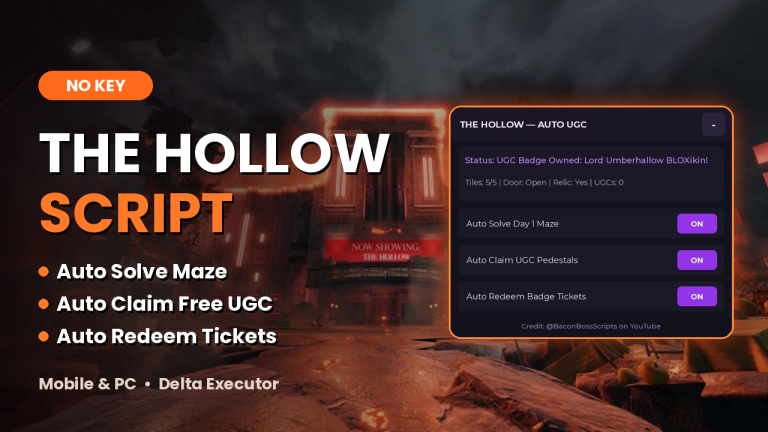
- The Hollow Script (No Key, 2026): Auto Solve Maze, Auto Claim UGC and Free Tickets | RobloxThe Hollow
- Steal an Egg Script (No Key, 2026): Auto Steal, Auto Hatch, Auto Farm, Egg ESP and Every HubSteal an Egg


Leave a Reply